
What 45,000 Logged AI Agent Runs Taught Us
Most writing about AI agents describes what they could do. This post is about what happened when ours ran every day for seven months. ShooflyAI runs its own business on a fleet of five AI agents, and every scheduled run is logged. As of September 25, 2026, that log held 45,884 runs across 232 workflows. We went through it to see what broke, how often, and why. One caveat before the numbers: a run is a scheduled execution, not a model call. About a third of the logged runs, roughly 15,000 on two of the five agents, are script-only jobs such as data syncs and health checks that the agents schedule and monitor without calling a model. For a sense of the model-driven activity, in the 30 days to September 29 the fleet completed about 11,000 agent runs and about 47,000 tool calls, on about $3,900 of model spend.
The short version: the model was rarely the problem. The failures that cost us the most came from infrastructure, from limits we had set ourselves, and from runs that said they worked when they had not.
What the data covers
The fleet is five AI agents. Three handle sales, operations and marketing work for ShooflyAI. Two handle project management and client delivery. Together they run 232 scheduled workflows, 145 of them active today. A workflow is one repeatable job, such as a morning pipeline brief, a data sync between two systems, a weekly report or a research scan.
Operations dominates because the fleet watches itself. A large share of runs are health checks, syncs and data refreshes that keep the other work honest.
How often runs failed
952 runs logged an error, about 2.1 percent of the total. That number needs one caveat. The two project management agents run on a different framework, and their logs recorded a single error across 23,513 runs. That reflects what those logs capture more than a perfect record. On the three agents with detailed failure logging, 951 of 22,371 runs failed, about 4.3 percent.
A 4 percent failure rate sounds manageable. The runs that worried us more were the ones that never showed up in it.
1A green status can hide a failed run
219 runs on the three well-instrumented agents finished with an “ok” status while their output showed the work had failed. Our own run dashboard spent 15 days showing two agents’ history frozen in place, because the job that fed it was reading an old copy of the data and reporting success. One of our daily research jobs sat broken for about two weeks while its status stayed green.
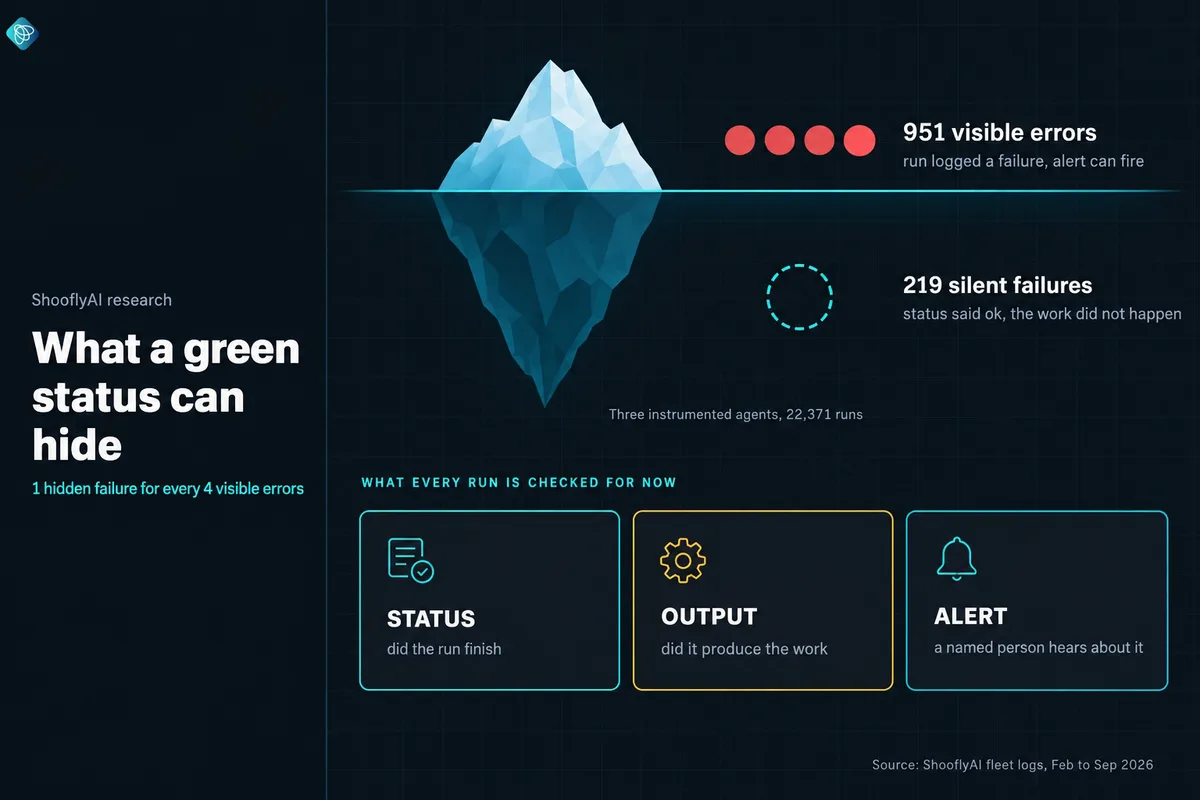
When we audited alerting on August 24, 46 of our 76 active scheduled jobs had no failure alert configured at all, so even the visible errors were reaching no one.
What we changed
Every run's output is now checked for failure markers, and a run that says "ok" but produced nothing useful is counted as a failure. Every job that matters has an alert with a named recipient.
2Infrastructure fails before the model does
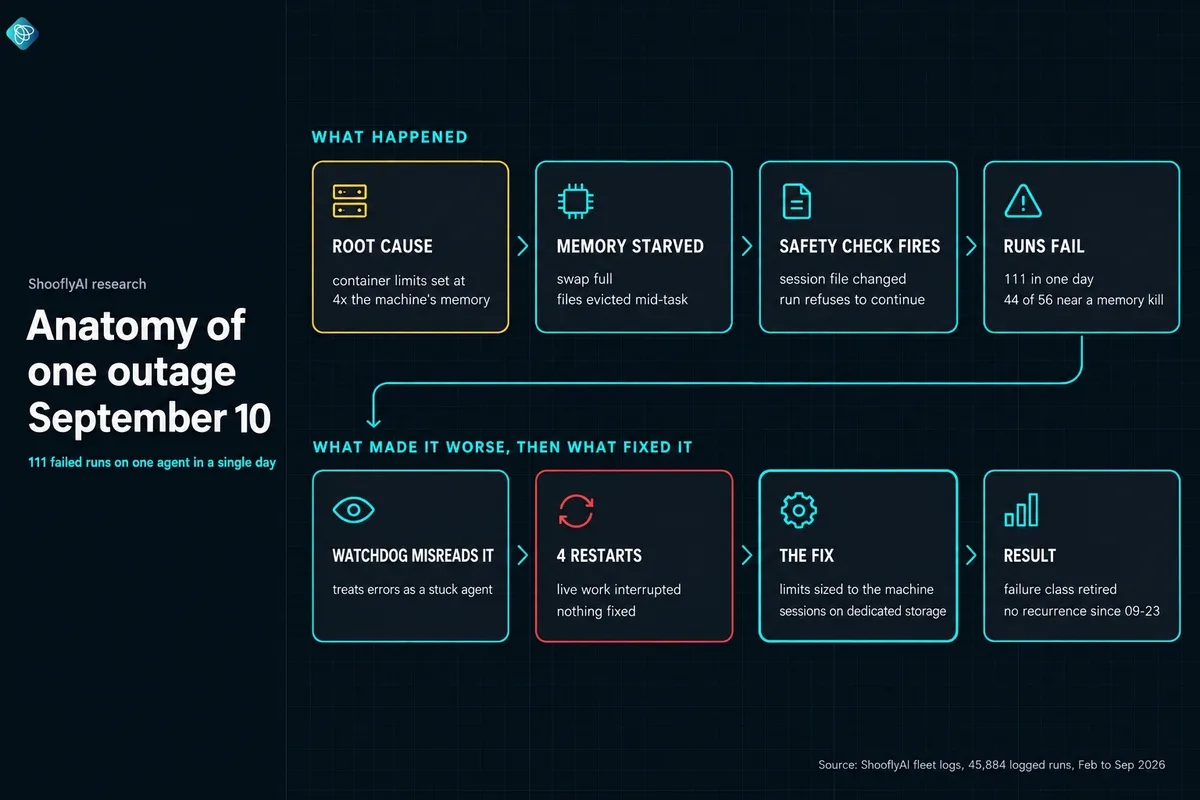
On September 10, one agent logged 111 failed runs in a single day, and two others logged about 60 and 52. The errors pointed at the agents’ own session files. The real cause was memory.
Under pressure the machine evicted files mid-task, and the agents' safety checks correctly refused to continue.
44 of 56 sampled failures happened within 15 minutes of the machine running out of memory. We capped each container to fit the machine, stopped an idle database stack that was holding memory, and moved the agents’ session files onto dedicated storage. That class of failure has not come back.
3An automatic restart can make an outage worse
During the same outage, a watchdog script we wrote to rescue stuck agents read the flood of errors as a stuck process and restarted two agents four times in one day. Each restart interrupted live work. None of them helped, because nothing was stuck. The machine was starved.
What we changed
The watchdog now checks memory pressure before it acts, skips the restart when the machine is starved, and sends one alert an hour. Any manual restart first confirms the agent has been idle for two minutes, after one restart cut off a reply that was being sent.
4The limits you set can quietly delete work
In mid September, direct messages to one agent were arriving and never getting answered. The agent kept a capped list of active conversations. Conversations from shared team channels are protected from cleanup, and there were more of them than the cap allowed.
With the list over the cap, the only entry cleanup could remove was the agent's own main conversation. Every maintenance pass deleted it.
Nothing crashed and no error pointed at the cap. We found it by reading the log line that appeared just before each failure. The cap is now 1,000, and the count of protected conversations is on a watch list because it only grows.
5Hand-offs break where nobody owns them
Our agents pass work to each other through a task queue. When we traced why delegated tasks went nowhere, we found four separate gaps:
Titles without briefs
Agents saw task titles only, so a 5,476-character brief arrived as one line.
No one marked a task as taken
The same task was picked up again every 15 minutes.
Expiry ran 8x too slowly
The job that clears expired tasks ran every 120 minutes when it was meant to run every 15.
Blocked looked like pending
16 blocked tasks were displayed as pending, so nobody knew to unblock them.
Each piece worked on its own. The failures lived in the seams between them. The fix was ownership: one component claims a task, one clears it, and the queue shows the real state of every task.
What this means if you are buying AI for your business
A demo shows an agent doing a task once. Production means the same task every day for months, on real infrastructure, next to other systems that change underneath it. The failure modes above are ordinary, and any fleet that runs long enough will hit versions of them.
Four questions separate a partner who runs AI in production from one who ships a build and leaves:
How do you detect a run that reports success but did not do the work?
Who gets alerted when a scheduled workflow fails or stops running, and how fast?
What limits does the system enforce, and what happens when one is hit?
Can we see the run history ourselves?
A partner who operates AI day to day should answer each one with specifics. For how to evaluate the rest of an engagement, see how to choose an AI implementation partner.
Methodology
The data comes from ShooflyAI's own agent fleet, which runs the company's internal sales, operations, marketing and delivery work. It does not include client systems.
Counts are taken from the run log that every scheduled workflow writes to, as of September 25, 2026, covering runs from February 20, 2026 onward. A run is one scheduled execution of one workflow; about 15,000 of the 45,884 are script-only runs that make no model call, and the run log for the two agents on that platform starts in late May and late June rather than February. "Error" means the run itself logged a failure. "Silent failure" means the run logged success while its output matched a known failure pattern, which is only detected on the three agents with output checks.
Figures are logged counts and have not been independently audited. Incident numbers come from our internal root-cause write-ups.
Frequently asked questions
How many AI agent runs does this research cover?
45,884 logged runs across 232 workflows run by five AI agents in ShooflyAI's own production fleet, between February 20 and September 25, 2026. A run is one scheduled execution of one workflow, such as a daily report, a data sync or a research brief. Not every run calls a model: about 15,000 of them, on two of the five agents, are script-only jobs (syncs, checks, file housekeeping) that the agents schedule and monitor. In the 30 days to September 29, the fleet completed about 11,000 model-driven runs and about 47,000 tool calls.
How often did AI agent runs fail?
952 of the 45,884 runs logged an error, about 2.1 percent. On the three agents with detailed failure logging, the rate was about 4.3 percent (951 errors in 22,371 runs). Separately, 219 runs on those agents reported success while their output showed the work had failed.
What is a silent failure in an AI agent?
A silent failure is a run that finishes with an 'ok' status even though the work it was meant to do did not happen. In our logs there was roughly one silent failure for every four visible errors. They only show up if you check the output of each run against what it was supposed to produce.
What caused the biggest AI agent outages?
Infrastructure. On one day in September a single agent had 111 failed runs, and 44 of 56 sampled failures happened within 15 minutes of the host running out of memory. Container memory limits added up to far more than the machine had. Right-sizing those limits and moving session files to dedicated storage ended that class of failure.
Should you restart an AI agent when it fails?
Only after you know why it failed. During the memory outage our own watchdog read the errors as a stuck process and restarted two agents four times in one day, which interrupted live work and fixed nothing. Diagnose first, then restart only if the cause is a stuck process.
What should you ask an AI implementation partner about monitoring?
Ask how they detect a run that reports success but did not do the work, who gets alerted when a scheduled workflow fails or stops running, what limits the system enforces and what happens when one is hit, and whether you can see run history yourself. A partner who runs AI in production should answer all four with specifics.